CVRO Succession Planning – Workshop Playbook
Build a future-ready talent pipeline by empowering employees, ensuring business continuity, and minimizing transition risks.
6 Key Stages in the Succession Planning Process
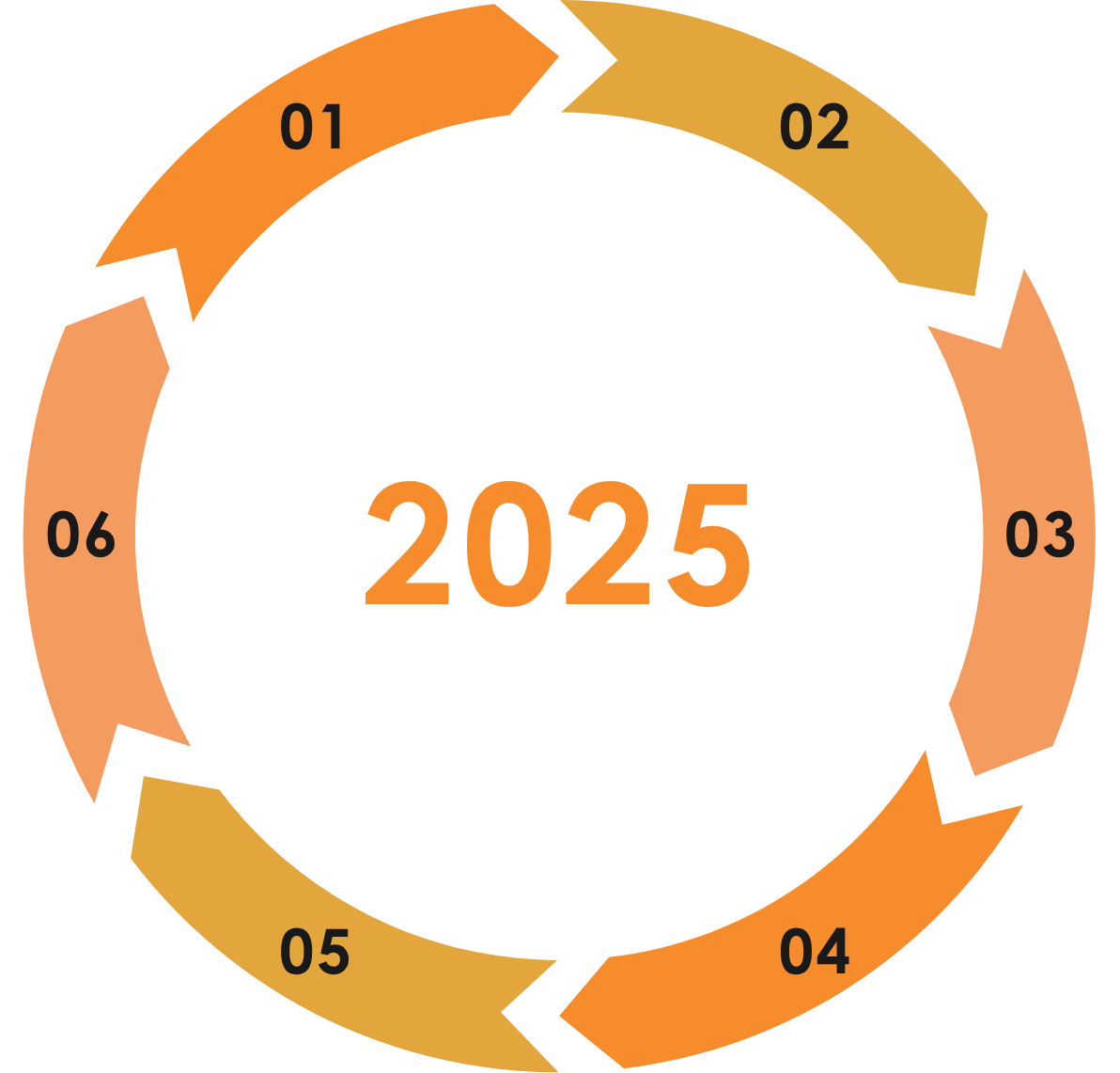
The succession planning process is designed as a 6-Stage framework, continuously improved each year to stay aligned with organizational needs and to optimize process effectiveness.
Annual Succession Planning Cycle
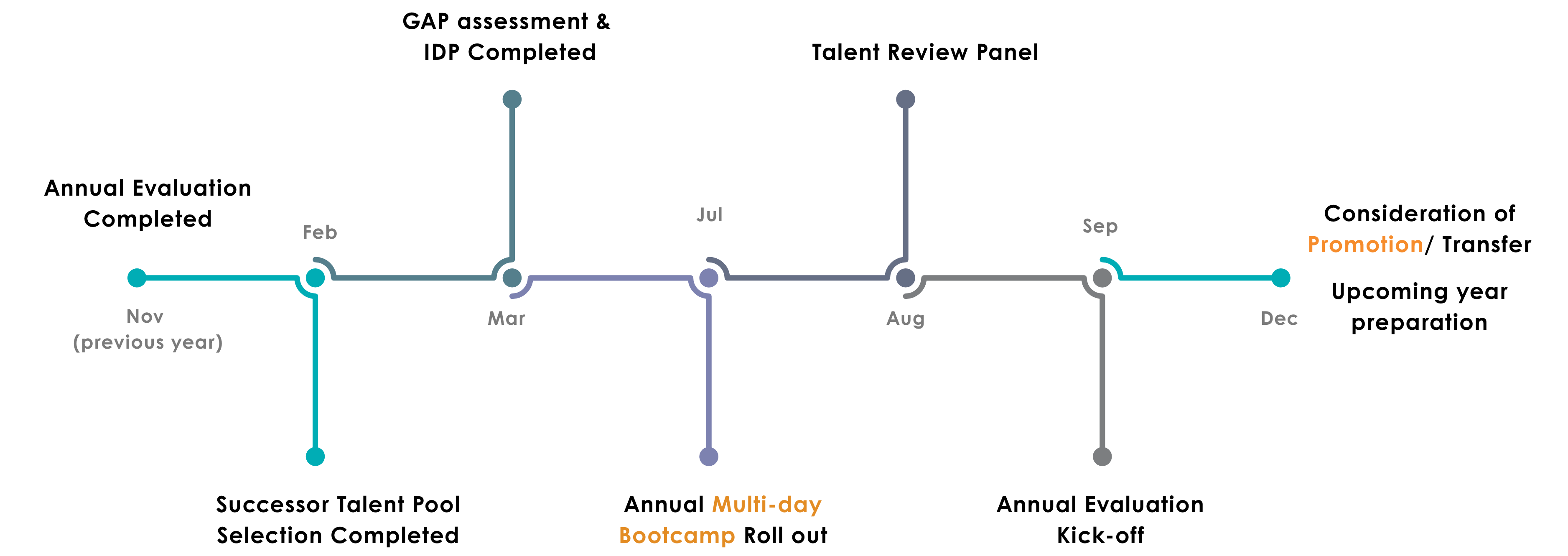
6‑Stage Framework
6 Key Stages Succession Planning Process
STAGE 1: Identify Critical Positions & Define Success Profile
To ensure organizational continuity by identifying the most business-critical positions for succession planning and clearly defining the expectations for successors.
Overview of Stage 1 to ensure continuity by identifying business-critical roles and defining clear success expectations.
🧭 Part A – Identify Critical Positions
HoDs assess positions within their departments to identify which are business-critical for succession planning. Each role is rated based on five equally weighted criteria:
- Succession Urgency & Internal Readiness
- Cost-to-Replace (including ramp-up & hidden costs)
- Leadership & Culture Impact
- Strategic Contribution
- Skill Scarcity & Market Competition
Scoring note: Rate each criterion from 1 to 5. The final score is the average of all five criteria (20% each).
🎯 Part B – Define Success Profile
Departments finalize the Success Profile for each selected role:
- Competency requirements: leadership & technical skills (criteria in the Performance Evaluation System).
- Job qualifications: education, experience, certifications, tools (from departmental JDs; consolidate into the template).
The finalized profile serves as the benchmark for Stage 3 – Gap Assessment.
CVRO Department Heads (HOD) are responsible for evaluating positions within their teams using below criteria:
📊 CVRO Customized Position Evaluation Criteria (Equal 20% each)
How urgent is it to ensure this role can be fulfilled seamlessly, and how prepared is the internal talent pipeline?
- 5 – Role requires urgent fulfillment within the near term; no internal successor is sufficiently prepared.
- 4 – Role likely needs fulfillment within 6–12 months; a successor exists but requires significant development.
- 3 – Role may need fulfillment within 1–2 years; a successor exists but requires moderate upskilling.
- 2 – No planned change, but medium risk of disruption; an internal candidate is nearly ready.
- 1 – Stable long-term; no anticipated changes and internal successor is fully ready.
How much cost is saved internally vs external? (including ramp-up & hidden costs)?
- 5 – Internal saves huge cost, minimal ramp-up.
- 4 – Noticeable saving, moderate training cost.
- 3 – Moderate saving, some training cost.
- 2 – Slight saving, low training cost.
- 1 – No cost advantage; same as external.
How strongly does this role inspire, influence, and shape company values, leadership culture, and team aspiration?
- 5 – Critical leadership role with strong influence on company values, leadership culture, and team aspiration. Inspires and motivates across the organization.
- 4 – Strong influence on department’s leadership culture and maintaining motivation.
- 3 – Moderate leadership/culture influence; role models desired behaviors.
- 2 – Minor leadership/culture influence; helps maintain team stability.
- 1 – Minimal influence.
If vacant, how would it affect company’s strategy?
- 5 – Cross-department, multi-functional strategic impact.
- 4 – Significant impact on one major department.
- 3 – Manageable impact, limited to certain areas.
- 2 – Minor or indirect impact.
- 1 – Minimal or negligible impact.
How rare are the skills required for this role, and how difficult is it to hire externally?
- 5 – Highly specialized skills, extremely hard to hire externally.
- 4 – Rare, difficult to hire.
- 3 – Moderate availability.
- 2 – Common, easy to hire.
- 1 – Very common skills.
1. Critical Role
≥4.2 points
Need to have the strategic consideration from top leadership.
2. High Importance
3.5–4.19 points
Requires successor planning application.
3. Moderate Importance
2.8–3.49 points
Important but not urgent; succession planning optional.
4. Low Importance
<2.8 points
Less critical at this stage
Note: HoDs may adjust classifications as needed, with rationale recorded.
Department Scoring Calculator
Part A – Identify Critical Positions
| No. | Role | Succession Urgency & Internal Readiness |
Cost-to-Replace | Leadership & Culture Impact | Strategic Impact | Skill Scarcity & Market Competition | Average Score | Result | Include in Succession Planning? | HoD Adjustment Rationale | Remove? |
|---|
* Score per criterion: 1–5. Average score = average of the 5 criteria (20% weight each).
Each department must review and finalize the Success Profile for each selected role intended for succession planning.
Section 1: Competency Requirements
| Areas | No. | Competency Name | Competency Description |
|---|---|---|---|
| Business/ Management Skills | 1 | Business Knowledge | Demonstrates a keen understanding of basic business operations and the organizational levers (systems, processes, departments, functions) that drive profitable growth, draws from personal experience to quickly evaluate business plans and processes to identify data or recommendations that need further investigation. |
| 2 | Customer Focus | Ensuring that the internal or external customer’s perspective is a driving force behind strategic priorities, business decisions, organizational processes, and individual activities, crafting and implementing service practices that meet customers’ and own organization’s needs, promoting and operationalizing customer service as a value. | |
| 3 | Decision Making | Identifying and understanding problems and opportunities by gathering, analyzing, and interpreting quantitative and qualitative information, choosing the best course of action by establishing clear decision criteria, generating and evaluating alternatives, and making timely decisions, taking action that is consistent with available facts and constraints and optimizes probable consequences. | |
| 4 | Operational Excellence | The systematic approach and integrated management philosophy that enhances the efficiency, quality, and effectiveness of the company's operations. | |
| Interpersonal Effectiveness | 5 | Communication | Conveying information and ideas clearly and concisely to individuals or groups in an engaging manner that helps them understand and retain the message, listening actively to others. |
| 6 | Emotional Intelligence Essentials | Establishing and sustaining trusting relationships by accurately perceiving and interpreting own and others’ emotions and behavior, leveraging insights to effectively manage own responses so that one’s behavior matches one’s values and delivers intended results. | |
| 7 | Cross-team Collaboration | The ability to effectively work across diverse teams, departments, and geographical locations to achieve common goals. | |
| Personal Attributes | 8 | Personal Courage | Proactively confronting difficult issues, making valiant choices and taking bold action in the face of opposition or fear. |
| 9 | Positive Approach | Demonstrating a positive attitude in the face of difficult or challenging situations, providing an uplifting (yet realistic) outlook on what the future holds and the opportunities it might present. | |
| 10 | Adaptability | Maintaining effectiveness when experiencing major changes in work responsibilities or environment (e.g., people, processes, structure, or culture), adjusting effectively to change by exploring the benefits, trying new approaches, and collaborating with others to make the change successful. | |
| Leadership Impact | 11 | Coaching and Developing Others | Providing feedback, instruction, and development guidance to help others excel in their current or future job responsibilities, planning and supporting the development of individual skills and abilities. |
| 12 | Driving Innovation | Creating an environment (culture) that inspires people to generate novel solutions with measurable value for existing and potential customers (internal or external), encouraging experimentation with new ways to solve work problems and seize opportunities that result in unique and differentiated solutions. | |
| 13 | Driving for Results | Setting high goals for personal and group accomplishment, using measurement methods to monitor progress toward goals, tenaciously working to meet or exceed goals while deriving satisfaction from that achievement and continuous improvement. | |
| 14 | Facilitating Change | Encouraging others to implement better approaches to address problems and opportunities, leading the implementation and acceptance of change within the workplace. | |
| 15 | Delegation and Empowerment | Identifying and leveraging opportunities to accelerate results and build capability by assigning tasks and decision-making responsibilities to individuals or teams with clear boundaries, expectations, support, and follow-up. |
Available in the Performance Evaluation System: Review & finalize the competency requirements of the successor role, including both leadership competencies and technical skills.
Section 2: Job Qualifications
Minimum years of relevant experience.
At least 5 years of experience in Engineering, Lean, or project management; furniture manufacturing background required; leadership experience required.
Required degree(s) and field(s).
College and above; major in Engineering, Lean, or Industrial Management.
Any industry or function-related certifications required.
Not specified in JD.
Requirements for English level, reporting ability, or customer-facing communication.
Effective English communication skills.
Systems, tools, or processes required.
NEWGO process; PPR reviews; drawings evaluation; AIS, CTN, RPDF review; vendor communication; PPR tracking; quality/process projects; AutoCAD; MS Office.
Include availability to travel, shift flexibility, domain knowledge, etc.
Work under high demands; manage multiple tasks; empathy; factory environment; lifting up to 50 lbs; bending/stooping; exposure to dirt, dust, chemicals, and noise.
Available in departmental JDs: Review the essential Job qualifications. This section must be reviewed and consolidated into the template
Success Profile – Department Templates (2025)
Success Profile templates for prioritized roles in Part A — to be reviewed by HoDs as guided in the Success Profile tab.
STAGE 2: Identify Talent Pool
To identifies the Talent Pool through 3 structured rounds. It ensures fairness and transparency, empowers employees to take initiative, and confirms the right fit for succession planning.
🧩 Round 1 – HoD Nomination
AHR filters employees using the 9-Box Grid from the 2025 Performance Evaluation and shares the Green Zone list with each HoD for nomination.
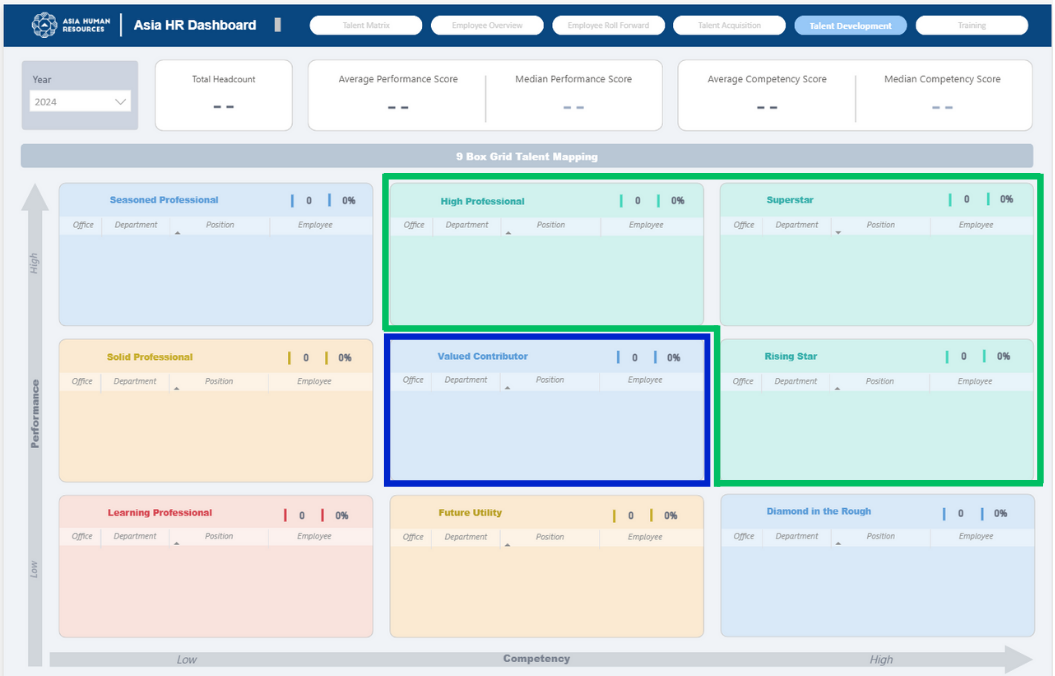
Group 1 – Green Zone (Superstar, High Professional, Rising Star)
Employees with above-average performance/competency scores. Suggested as priority for Talent Pool consideration.
Group 2 – Blue Zone (Valued Contributor)
Employees who may be considered if they show outstanding traits, strong learning agility, and ambition for growth. Suggested as optional pool if needed.
Guidelines: HoDs will receive only the Green Zone list and may tick nominees for Round 2 directly. If they wish to include additional names from Blue Zone, rationale must be provided. Exclusion of Green Zone names does not require justification, but AHR recommends that no rationale be related to gender, pregnancy, or any other personal factor.
HoDs use the Pre-Nomination Checklist and Candidate List to finalize the nomination. This step acts as a pre-screening stage to identify employees with development potential before the self-application phase.
📝 Round 2 – Candidate Self-Application
- In Round 2, HoD-nominated employees are empowered to reflect on and articulate their own development direction by independently completing a standardized Candidate Profile via the Candidate Profile Builder.
- Candidates then submit their self-application through a MS Form, attaching the generated PDF and Excel Candidate Profile exported from the Builder.
- All Candidate Profiles are consolidated by AHR and shared with relevant HoDs in Round 3 to support structured talent discussion and role alignment
👤 Basic Information (Captured from Candidate Profile)
- Full name
- —
- Department
- —
- Current role
- —
Development Preferences – Roles (Declared by Candidate)
Candidates may list one or two role preferences. At least one preference is within the current department. Cross-department interest (if any) is indicated for development discussion.
Development Preferences – Reasons (Candidate Rationale)
—
—
Role-Specific – Leadership (Candidate Response)
This section captures how the candidate plans to lead, supported by one concrete example using SBI (Situation – Behavior – Impact).
Career Aspiration & Motivation (Candidate Perspective)
—
—
Optional – Self-leadership
—
Mobility – Department Change
- Open to change dept?
- —
No candidate ranking, selection, or exclusion takes place in Round 2. HoD review and discussion formally begin in Round 3.
🤝 Round 3 – HoD Review & Position Matching
From successor applications, HoDs receive segmented lists for review:
(same department)
(from other departments)
(to other departments)
- HoD reviews candidate profiles and selects successors based on fit with the Success Profile.
- Considers department capacity to provide follow-up development for each position (from Stage 1).
- AHR consolidates endorsed candidates for Gap Assessment (Stage 3).
- Non-selected applicants receive a thank-you message and development encouragement.
Important notes:
- Cross-department applications should be handled with sensitivity and clear communication.
- Employees are encouraged to apply cross-functionally when roles align with their skills and long-term career goals.
- HoDs should view cross-applications as growth potential — not dissatisfaction or disengagement.
🧩 Round 3 Example Scenario – HoD Review & Position Matching
In the Engineering Department, the HoD reviews candidates for the successor role Senior Process Engineer using three lists — internal, incoming, and outgoing applicants.
After evaluating all profiles against the Success Profile, a shortlist of three candidates is created. The HoD endorses two candidates for this two-year cycle based on the department’s capacity for structured development.
| Candidate | Segment | Fit vs. Success Profile | Decision |
|---|---|---|---|
| Nguyen A | Internal | High | ✅ Endorsed |
| Tran B | Incoming | High | ✅ Endorsed |
| Le C | Outgoing | Low | ⏳ Not prioritized (this cycle) |
In actual practice, HoDs will complete this process in the Excel file “HoD Role Matching Template”. A How-to Video will be provided to guide to complete the file.
AHR then consolidates the confirmed names to prepare for the next step — Gap Assessment. Candidates who are not selected in this round will receive a thank-you message recognizing their effort and encouraging continued career growth within Ashley.
STAGE 3: Gap Assessment
To evaluate the readiness and development gaps of endorsed candidates through structured self-assessment and HoD validation, comparing their current capabilities against the defined Success Profile — with the goal of identifying a focused group of high-potential, high-readiness successors for prioritized and targeted development investment.
📝 Part A – Candidate Self-Assessment
Candidates self-assess their competency levels and job qualifications based on the targeted successor position, identifying key strengths and development actions.
Competency Self-Assessment – Instruction
| Level | Description | Assessment Criteria for Gap Evaluation |
|---|---|---|
| 1 | Foundational Awareness | Represents minimal to very limited exposure. Demonstrates basic recognition or understanding of the competency but is not yet able to perform tasks independently. Can only complete simple or guided tasks under close supervision and continuous direction. |
| 2 | Functional / Basic Application | Able to perform standard tasks related to this competency with partial support. Applies the competency in familiar or simple situations. May still require guidance when facing new, unfamiliar, or more complex tasks. |
| 3 | Proficient / Independent | Performs tasks related to this competency independently and accurately under normal conditions. Can apply the competency in difficult or non-routine situations. Requires only occasional guidance and is generally reliable in execution. |
| 4 | Advanced / Expert | Demonstrates advanced mastery of the competency. Performs tasks with little to no guidance, applies the competency effectively in complex situations, and contributes by teaching, mentoring, or guiding others. Often sets standards or provides leadership in the area. |
This table uses the Team Leader of Product Engineering role as a sample to illustrate how a candidate may self-rate and explain their readiness.
| Areas | No. |
Competency Name
|
Self-Rating | Example Explanation (Candidate) |
|---|---|---|---|---|
| Business / Management Skills | 1 |
Demonstrates a keen understanding of basic business operations and the organizational levers (systems, processes, departments, functions) that drive profitable growth, draws from personal experience to quickly evaluate business plans and processes to identify data or recommendations that need further investigation.
|
2 |
[S] In cost and vendor review meetings, I understand the technical content but often rely on others to explain the full financial and commercial impact. [B] I can review engineering data independently, but I still need close guidance when linking it to margin, cost-to-serve, or long-term business trade-offs. [I] Because of this gap, I cannot yet evaluate proposals end-to-end on my own and need more structured exposure to basic finance and business levers. |
| 2 |
Ensuring that the internal or external customer's perspective is a driving force behind strategic priorities, business decisions, organizational processes, and individual activities, crafting and implementing service practices that meet customers' and own organization's needs, promoting and operationalizing customer service as a value.
|
3 |
[S] When preparing engineering proposals, I independently consult internal customers (QA, PD, SCO) to confirm their expectations before finalizing. [B] I adjust designs and timelines based on their feedback and can manage most follow-up discussions without support, including resolving minor conflicts. [I] My approach generally meets their needs, but I still seek occasional guidance on how to anticipate future customer requirements earlier in the process. |
|
| 3 |
Identifying and understanding problems and opportunities by gathering, analyzing, and interpreting quantitative and qualitative information, choosing the best course of action by establishing clear decision criteria, generating and evaluating alternatives, and making timely decisions, taking action that is consistent with available facts and constraints and optimizes probable consequences.
|
3 |
[S] During pilot trials, I regularly make independent decisions on set-up changes when unexpected quality or capacity issues appear. [B] I review available data, compare options, and choose a practical solution without waiting for my manager, then communicate the rationale to stakeholders. [I] These decisions are usually solid, though I still ask for guidance in very high-risk cases to strengthen my judgment in complex trade-off situations. |
|
| 4 |
The systematic approach and integrated management philosophy that enhances the efficiency, quality, and effectiveness of the company's operations.
|
2 |
[S] I participate in troubleshooting sessions and waste-reduction workshops, but I usually support rather than lead the improvement activities. [B] I can help collect data and suggest ideas; however, I still depend on more experienced colleagues to structure the project, define KPIs, and follow through. [I] As a result, I do not yet drive continuous improvement independently and need more coaching and practice owning an end-to-end CI project. |
|
| Interpersonal Effectiveness | 5 |
Conveying information and ideas clearly and concisely to individuals or groups in an engaging manner that helps them understand and retain the message, listening actively to others.
|
4 |
[S] I regularly lead technical presentations for cross-functional teams and senior leaders, including complex engineering changes and trial results. [B] I adapt my messages to different audiences, coach juniors on how to present clearly, and often review their slides or reports before they share externally. [I] Feedback from stakeholders shows that my communication helps alignment and faster decisions, and I am seen as a reference point for effective presentations. |
| 6 |
Establishing and sustaining trusting relationships by accurately perceiving and interpreting own and others' emotions and behavior, leveraging insights to effectively manage own responses so that one's behavior matches one's values and delivers intended results.
|
2 |
[S] Under tight deadlines, team stress increases and I sometimes react quickly when issues escalate on the shop floor. [B] I try to stay calm, but I still need guidance to better recognize others' emotions and to pause before responding in tense discussions. [I] This occasionally leads to misunderstandings, so I am focusing on building self-awareness and active listening before I can manage these situations independently. |
|
| 7 |
The ability to effectively work across diverse teams, departments, and geographical locations to achieve common goals.
|
2 |
[S] I work closely with QA and vendors on daily engineering issues, but most coordination is task-based and initiated by others. [B] I can maintain good working relationships; however, I still rely on my manager to lead broader cross-department initiatives or resolve misalignment. [I] My collaboration impact is therefore limited, and I need more experience initiating and owning cross-team projects with PD, SCO, and other functions. |
|
| Personal Attributes | 8 |
Proactively confronting difficult issues, making valiant choices and taking bold action in the face of opposition or fear.
|
2 |
[S] In project review meetings, I sometimes hesitate to challenge senior opinions even when data suggests a different direction. [B] I speak up more confidently in smaller groups, but in larger or high-visibility forums I still need encouragement or support to voice difficult messages. [I] This reduces my influence on key decisions, and I am working on using facts and preparation to raise concerns more assertively and independently. |
| 9 |
Demonstrating a positive attitude in the face of difficult or challenging situations, providing an uplifting (yet realistic) outlook on what the future holds and the opportunities it might present.
|
3 |
[S] When projects face delays or rework, I remain solution-oriented and help the team focus on what we can learn from the issue. [B] I independently encourage colleagues to look for options instead of blaming, and I help reframe problems so the team can move forward. [I] My attitude generally keeps momentum, though I still seek advice on how to acknowledge deeper frustrations while staying realistic and optimistic. |
|
| 10 |
Maintaining effectiveness when experiencing major changes in work responsibilities or environment (e.g., people, processes, structure, or culture), adjusting effectively to change by exploring the benefits, trying new approaches, and collaborating with others to make the change successful.
|
3 |
[S] Priorities often shift due to vendor or quality changes, and I adjust my plans and task allocation for the team without waiting for detailed instructions. [B] I independently help operators and junior engineers adapt to new requirements, explaining what has changed and what they need to do differently. [I] Work remains on track, but I still look for guidance on how to communicate major changes earlier to stakeholders outside my immediate team. |
|
| Leadership Impact | 11 |
Providing feedback, instruction, and development guidance to help others excel in their current or future job responsibilities, planning and supporting the development of individual skills and abilities.
|
2 |
[S] Juniors frequently come to me for help with drawings, trial preparation, and daily problem-solving. [B] I provide ad-hoc guidance, but I do not yet follow a consistent approach to set development goals, track progress, or give structured feedback. [I] Because of this, their growth depends on daily issues rather than a clear plan, and I need mentoring myself to coach others more systematically. |
| 12 |
Creating an environment (culture) that inspires people to generate novel solutions with measurable value for existing and potential customers (internal or external), encouraging experimentation with new ways to solve work problems and seize opportunities that result in unique and differentiated solutions.
|
1 |
[S] My current focus is mainly on executing existing processes and standards rather than exploring new methods or tools. [B] I rarely propose experimental approaches, and when ideas arise, I usually pass them to others instead of developing and testing them myself. [I] My contribution to innovation is therefore minimal at this stage, and I need foundational exposure to creative problem-solving techniques and small pilot projects. |
|
| 13 |
Setting high goals for personal and group accomplishment, using measurement methods to monitor progress toward goals, tenaciously working to meet or exceed goals while deriving satisfaction from that achievement and continuous improvement.
|
3 |
[S] Before pilot builds, deadlines become tight and I independently track key tasks, follow up with stakeholders, and escalate risks early. [B] I use simple trackers and checkpoints to keep the team aligned on priorities and usually deliver commitments on time without close supervision. [I] Results are solid overall, though I still seek guidance on balancing urgent issues with long-term improvements to further strengthen performance. |
|
| 14 |
Encouraging others to implement better approaches to address problems and opportunities, leading the implementation and acceptance of change within the workplace.
|
2 |
[S] When new processes or standards are introduced, I support the rollout but usually follow the communication led by my manager. [B] I can answer basic questions from operators, yet I rely on others to explain the broader "why" behind the change or to handle strong resistance. [I] This means I help with implementation but do not truly lead change, and I need more practice facilitating discussions and addressing concerns directly. |
|
| 15 |
Identifying and leveraging opportunities to accelerate results and build capability by assigning tasks and decision-making responsibilities to individuals or teams with clear boundaries, expectations, support, and follow-up.
|
2 |
[S] I often keep detailed tasks myself to ensure accuracy, especially in time-sensitive projects. [B] When I delegate, I sometimes give general instructions without fully clarifying expectations, decision boundaries, or follow-up checkpoints. [I] This can cause rework and limits team capability, so I need guidance on structuring delegation so that others can own tasks more independently. |
🔸 The examples above demonstrate how to apply the SBI method when explaining ratings. AHR reminds candidates to base their self-ratings on consistent, demonstrated behavior, and encourages HoDs to validate scores using the same standard—avoiding judgments based on single incidents or exceptional situations.
Job Qualifications Self-Assessment – Instruction
Describe how the candidate’s current experience aligns with the job qualifications defined in the Successor Profile of the intended successor role (e.g., education, years of experience, certifications, tools, and communication skills).
| Level | Description | Qualification Definition |
|---|---|---|
| 1 | Limited relevance | Background, knowledge, or exposure is basic or only partly related to the requirement; alignment with the role is still low. |
| 2 | Requirement met | Has the core qualification needed for the role (e.g., relevant education, basic proficiency, minimum experience, or a required certification). |
| 3 | Strong alignment | Holds broader, deeper, or more developed qualifications than the basic requirement (e.g., higher proficiency, additional certifications, or wider exposure in relevant areas). |
| 4 | Exceptional alignment | Brings extensive breadth or depth of qualification related to the role (e.g., advanced academic achievement, multiple certifications, long-standing experience, or specialized expertise). |
This table uses the Team Leader of Product Engineering role as a sample to illustrate how a candidate may self-rate and explain their readiness.
| Field | Requirement (Sample) | Self-Rating | Example Explanation (Candidate) |
|---|---|---|---|
| Years of Experience Required | At least 5 years of experience in Engineering, Lean, or project management; furniture manufacturing background required; leadership experience required. | 2 | I have 4 years of experience in engineering and process improvement, mainly supporting manufacturing optimization projects. I have coordinated small task groups but have not held a formal leadership role. I still need broader exposure to furniture manufacturing and more structured people-leadership responsibilities. |
| Educational Background | College and above; major in Engineering, Lean, or Industrial Management. | 3 | I hold a Bachelor’s degree in Industrial Engineering. The major aligns directly with the role requirements, and I regularly apply engineering concepts in process improvement and technical problem-solving. |
| Certifications | Not specified in JD. | 3 | The role does not require specific certifications. I have completed internal courses on Lean, problem solving, and factory processes, and I plan to pursue a Lean certification to further strengthen my technical foundation. |
| Functional/Technical Knowledge | NEWGO process; PPR reviews; drawings evaluation; AIS, CTN, RPDF review; vendor communication; PPR tracking; quality/process projects; AutoCAD; MS Office. | 2 | I have strong experience with AutoCAD, MS Office, and quality/process improvement projects. However, I still need more hands-on practice with NEWGO, CTN/RPDF reviews, and independent drawing evaluation. I am also developing deeper vendor communication skills for more technical discussions. |
| Language/ Communication Skills | Effective English communication skills. | 3 | I use English regularly when preparing reports and communicating with cross-functional teams. I can explain technical issues clearly, though I continue to improve my fluency for discussions with overseas suppliers and more complex topics. |
| Other Role-Specific Requirements | Work under high demands; manage multiple tasks; empathy; factory environment; lifting up to 50 lbs; bending/stooping; exposure to dirt, dust, chemicals, and noise. | 3 | I work daily on the production floor and am comfortable operating in a fast-paced, high-demand environment. I manage multiple engineering tasks simultaneously and communicate with operators and supervisors with empathy. I meet the physical requirements, including lifting and mobility in factory conditions. |
🔸 This self-assessment is for development planning only and does not guarantee promotion. Please rate yourself honestly so that your HoD and AHR can design realistic development support and close the right gaps.
✅ Part B – HoD / Manager Validation
HoD validates the candidate’s self-ratings, provides comments, and may adjust the numerical score (1–3) if needed. Then use the Readiness Scale to classify:
🔸 Each readiness level should reflect consistent, observable behavior over time — not a single event.
🔸 Candidates can view comments and adjusted ratings; the readiness level is visible to AHR & HoD only.
Training sessions planned for this stage:
- AHR hosts a Candidate Orientation Workshop before the Gap Assessment stage to introduce program goals, equip candidates to complete self-assessment & understand expectations, and train them to provide structured explanations using the SBI (Situation–Behavior–Impact) method.
- An optional Manager Validation Workshop is also conducted to instruct HoDs and managers on how to validate assessments, provide constructive written feedback, and apply the Readiness Scale consistently across departments.
📊 Part C – Gap Summary & Talent Pool Confirmation
AHR consolidates all validated assessments into a clear visualization of competency gaps, qualification alignment, and behavioral evidence across departments. These insights help leaders recognize strengths, pinpoint development themes, and prioritize investment areas for capability building.
Based on the Readiness Scale applied in Part B, candidates are classified and subsequently grouped into three talent categories each with clear development focus and corresponding next-step actions as outlined below:
🟢 Official Talent Pool
- Proceed to Stage 4 – IDP Execution.
- Enroll in structured development plan.
- Prepare for the Talent Review Event.
🟡 Talent Watch List
- Longer-term coaching & tracking with department leaders.
- Targeted exposure to build readiness.
- Consider in next succession cycle.
🔴 Development Hold Group
- Provide constructive feedback & guidance.
- Encourage self-development and re-entry later.
- Receive a thank-you email for participation.
Outcome:
The Talent Pool forms the primary focus group and foundation for Stage 4 – IDP Execution and upcoming Stage 5 – Talent Review Presentations. The Talent Watch List serves as the near-term feeder group, supported for sustained growth and future readiness in the next cycle.
STAGE 4: IDP Execution – Closing the Gap
Enable successors to address identified gaps and strengthen readiness through a personalized development plan, guided by the 70-20-10 learning model. The plan emphasizes strong support and regular follow-up by managers and quarterly reviews to ensure accountability and progress along the development path.
What is an IDP?
A living plan of skills, goals, and 70-20-10 actions guiding successors toward target roles.
Why do we use it?
It turns Step 3 gaps into a clear, trackable development roadmap with quarterly review & accountability.
Who uses it in this program?
Successors draft & update · HoDs / Leaders coach & review · AHR tracks & supports.
🧩 IDP Design Process
- AHR conducts workshop on the IDP template, 70–20–10 framework, milestones, and evidence standards.
- Successors draft IDP aligned with readiness level and Success Profile, defining milestones, evidence, support, and risks.
- Managers & AHR review drafts for feasibility and learning balance before HoD approval.
- Successors execute & track their 70–20–10 actions quarterly, with progress reviewed and consolidated for the annual bootcamp program.
🏕️ Talent Uplift Bootcamp
A high-energy, multi-day journey blending case-based simulations, peer-learning circles, and expert mini-workshops—built on the 70–20–10 model to accelerate leadership, collaboration, and strategic thinking while boosting visibility with management.
Impact
Real business challenges turn learning into practical readiness and influence beyond authority.
Visibility
Pitch to management, gain confidence & recognition through direct feedback.
IDP & Talent Review
Equips successors with essential presentation skills to excel in the Talent Review Event (Stage 5) and showcase their growth.
Focused on closing common gaps from the Gap Analysis Summary, the Bootcamp translates learning into actionable outcomes—with AHR & HoDs guiding mentoring, project assignments, and exposure opportunities across the year.
🔁 Tracking & Review Cycle
- Draft — define quarterly milestones, target dates, and evidence.
- Review — leader validates priorities; HoD approves plan.
- Update — submit progress and next actions by last Friday of each quarter.
- Monitor — AHR tracks submissions, readiness movement, and flags overdue items.
End-to-End IDP Execution Flow
-
AHR-led IDP Workshop AHR
AHR conducts a workshop on the IDP template, 70–20–10 framework, milestones, and evidence standards.
-
Successor Drafts IDP Successor
Successors draft their IDP aligned with readiness level and Success Profile, defining quarterly milestones, evidence, support, and risks.
-
Direct Manager Reviews Leader
The direct manager reviews the draft with the successor to confirm priorities, resourcing, and alignment with team plans; revisions are made before sending forward.
-
AHR Reviews & Suggests AHR
Upon request (recommended), AHR provides consultative feedback to refine the 70/20/10 balance, feasibility, evidence standards, and risk/support plan—helping finalize the IDP before HoD approval.
-
HoD Approves HoD
HoD validates priorities, confirms resources, and formally approves the IDP via email confirmation.
-
Quarterly Tracking & Reporting (TBD) Successor + HoD + AHR
Successors update progress and evidence quarterly (due: last Friday of each quarter); HoDs review and approve; AHR consolidates results in Power BI and flags overdue items.
-
Bootcamp Program Planning & Execution Successor + HoD + AHR
Based on the Gap Analysis Summary Report, AHR designs and delivers a structured, multi-day “bootcamp” once per year. This program focuses on the most common competency or skill gaps shared across the successor group through hands-on workshops, mentoring circles, and experiential learning sessions.
70–20–10 Learning Framework
- Lead/support a cross-functional strategic project.
- Temporarily take on a managerial role during a manager’s absence (acting role/ stretch assignment).
- Participate in short-term rotations or job shadowing in other teams (without formal transfer).
- Join leadership meetings or prepare materials.
- Facilitate mid-year/year-end review discussions for the team.
- Take ownership of a real, unresolved issue in the team and present a proposed solution.
- Contribute to building the team’s people plan or budget.
- Buddy with a more senior or experienced peer.
- Mentoring from a senior leader.
- Join a peer learning group with other successors or high-potential colleagues.
- 1:1 coaching from internal or external experts.
- Participate in interactive workshops and engage in peer group reflections or discussions.
- Receive regular leadership-focused feedback from your direct manager (bi-weekly or monthly).
- Attend leadership development courses (internal or external).
- Join deep-dive internal training sessions (e.g. on performance management or strategic thinking).
- Receive company support to pursue professional certifications (e.g. PMP, HRBP, CFA...).
- Enroll in short-term executive programs.
- Take curated learning paths on platforms like Udemy.
- Get 1:1 coaching (face-to-face or via MS Teams) from international experts (e.g. AFI) on a structured coaching program.
- Ashley Learning Center Resources.
⚠ ️Reminder
- Ensure successors promptly notify you and AHR of any changes to goals, milestones, timelines, support, or risks.
- Review quarterly updates only when evidence (links/files) is attached and clearly mapped to milestones.
- Provide feedback, confirm priorities/resources, and approve the IDP each quarter (due: last Friday of the quarter).
- Follow up on overdue or low-quality submissions; escalate support/resource gaps to AHR as needed.
STAGE 5: Talent Review Presentation
🌼 Annual · suggested: AugustProvide successors with a formal platform to present development progress directly to senior leadership, demonstrate growth, share future plans, and receive constructive feedback. This session reinforces accountability, increases successor visibility at senior levels, and strengthens long-term commitment to development.
Purpose
Give successors a visible, structured forum to present IDP progress, lessons learned, and next-period plan to a leadership panel.
Timing: Held annually — suggested August.
Key Moment: The Talent Review Presentation
Successors share lessons learned, development evidence, and a refined action plan with the panel.
Event Format
- → Successor presents IDP progress directly to the panel (Direct Leader, HoD, AHR, senior leaders if available).
- → Presentation covers lessons learned, key actions, evidence, and next-period IDP.
- → Panel provides developmental feedback and guidance for next steps.
Ongoing Reporting
After the presentation, successors revise their IDP based on panel feedback. Quarterly updates feed the AHR dashboard / Power BI tracking.
Important Reminders
- Update IDP immediately after the Talent Review Presentation.
- Submit quarterly IDP progress by the last Friday of each quarter.
STAGE 6: Continuous Review & Yearly Refresh
Sustain the momentum of succession planning by continuously tracking progress, measuring development impact, and refreshing the Talent Pool annually to align with evolving business needs and employee readiness.
Semi-Annual
- • % of critical roles with at least one identified successor
- • % of successors submitting IDP updates on time
- • % of IDP action items completed as planned
- • Talent Pool participation rate in development activities (workshops, bootcamps, coaching, etc.)
Annual
- • % of critical positions successfully filled by Talent Pool successors (internal promotion rate)
- • % of successors progressing in readiness level (e.g., from Ready Later → Ready Soon or Ready Immediate)
- • Talent Pool retention rate (how many remain engaged and active over 12–18 months)
Post-Talent Review Feedback:
- • Successor feedback on development experience
- • HoD satisfaction with successor progress
- • Training effectiveness based on post-event evaluation
- • Feedback collected from managers and candidates
Continuous Improvement:
- • Adjust process, tools, and readiness framework based on feedback
- • Refresh Talent Pool members after annual performance evaluation
- • Communicate the updated Talent Pool to leadership
- • Re-enter cycle for the following year
Management Hub
A centralized management space for department folders and AI-enabled tools that support development activities across stages.
Department Document Hub
Access your department’s SharePoint folder by stage
* Each HoD can access only their assigned department folder (SharePoint permissions applied).
IDP Chat Box
Coming SoonAuto-suggest 70-20-10 activities based on Success Profile & GAP
* Will connect JD, Success Profile, and GAP data (Step 3) to auto-suggest learning activities.
FAQ – HoD Responsibilities in Succession Planning
Frequently asked questions to help Heads of Department understand their key actions across each stage.
Review all your team’s current positions with the scoring criteria provided and combine it with your own experience and judgment—consider the positions categorized as High Importance to be involved in the succession planning program.
You are expected to actively participate in Round 1 – HoD Nomination by reviewing the Green Zone participants in the 9-Box Grid. Asia HR will handle Round 2 – Candidate Self-Application. Then again, you are expected to actively participate in HoD Review & Position Matching to review applications and match candidates to their suitable positions for Stage 3 – Gap Assessment.
You’ll review each candidate’s self-assessment on competencies and qualifications, provide comments, and determine readiness categories such as “Ready Now (≤6 months)”, “Ready Soon (≤2 years)”, or “Ready Later (≥2 years)”. Those in “Ready Now” or “Ready Soon” move forward to the Talent Pool and IDP development program.
Help team members set realistic goals through Individual Development Plans (IDPs)—assigning appropriate work projects, mentorship, or training opportunities. Asia HR will co-facilitate workshops and provide guidance for both HoDs and team members to ensure successful IDP development.
Yes. You are expected to join scheduled briefings, training sessions, and review meetings organized by HR or program facilitators to stay updated and aligned with the correct process.
Clearly communicate the framework, expectations, and timelines to your team. Help them understand how to participate and the benefits of being part of the succession planning journey.
Your main duties are decision-making and talent development. Administrative work such as tracking and reminders is handled primarily by the Asia HR program organizers.
Yes. You are encouraged to share feedback and report issues with program organizers. Your input helps improve the process and resolve challenges affecting your department’s participation.
I have a question!
Type your question below and click send.